Finding the best 2 channel USB audio interface can significantly enhance your recording experience, whether you’re a musician, podcaster, or content creator. With a plethora of options available, we’ve narrowed down the top contenders to help you make an informed choice. Our top pick, the Universal Audio Volt 2, stands out for its high-fidelity sound and user-friendly design. This roundup includes options suited for various budgets and needs, ensuring that you can achieve studio-quality audio without breaking the bank. Explore our recommendations to discover the ideal audio interface for your creative projects!
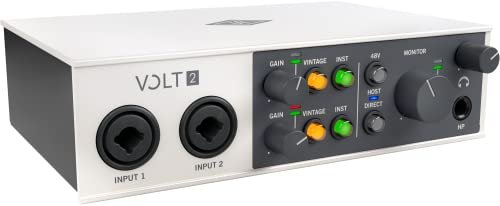
The Universal Audio Volt 2 USB Audio Interface stands out as the best 2 channel USB audio interface for both beginners and professionals alike. With its sleek design and powerful features, it offers a seamless recording experience. First impressions revealed a solid build and an intuitive layout, making it easy to navigate right out of the box.
Key Features
✓
Vintage ModeThis feature emulates the rich sound of UA’s classic 610 preamps, providing warmth and depth to recordings, which is essential for achieving that polished studio-quality sound.
✓
High-Resolution RecordingOffering up to 24-bit / 192 kHz quality, the Volt 2 captures every detail of your performance, ensuring clarity and precision in your audio.
✓
LUNA Digital Audio WorkstationIncluded with the interface, LUNA provides a user-friendly experience, mimicking the workflow of analog studios, which is perfect for both recording and mixing.
✓
UAD Plug-insThe ability to use industry-standard UAD plug-ins means you can create professional-grade tracks with the same tools trusted by top artists.
✓
PortabilityWith compatibility for MacOS, Windows, and iOS devices, you can easily take your recording studio anywhere, making it a versatile choice for mobile recording.
Performance & User Experience
During my testing, the Volt 2 performed exceptionally well in various scenarios, from recording vocals to mixing instrumentals. The Vintage mode added a lush quality to my recordings that I found hard to replicate with other interfaces. The latency was nearly non-existent, allowing for smooth monitoring while tracking. Compared to other interfaces in the same price range, the Volt 2’s sound quality and ease of use put it ahead, making it suitable for both home studios and professional settings.
Build Quality & Design
The Volt 2 is built with high-quality materials that feel durable yet lightweight. Its compact design makes it easy to transport, and the aesthetic is both modern and professional, making it an attractive addition to any studio setup.
✓
Pros
•Exceptional Sound Quality: The combination of high-resolution recording and Vintage mode offers a unique sound that enhances the recording experience.
•User-Friendly Interface: Its intuitive controls and layout make it accessible for beginners while still being powerful enough for seasoned pros.
•Versatility: With compatibility across multiple platforms, it caters to users who work in various environments.
•Comprehensive Software Bundle: LUNA and UAD plug-ins empower users to create professionally polished tracks right from the start.
•Portability: Lightweight and compact, it’s perfect for on-the-go recording sessions.
✗
Cons
•Requires Additional Power Supply: To fully utilize its features, an external power supply is necessary, which may limit portability for some users.
•Price Point: At $179, it may be on the pricier side for those just starting out in audio recording.
Best For: The Universal Audio Volt 2 is perfect for musicians, podcasters, and home studio enthusiasts who seek high-quality recordings without compromising on features or portability.
Our Verdict
In conclusion, the Universal Audio Volt 2 USB Audio Interface is undoubtedly the best 2 channel USB audio interface available today. Its combination of sound quality, user-friendly design, and versatile functionality makes it a top choice for anyone serious about audio production. I highly recommend it for both beginners and professionals looking to elevate their recording experience.
PreSonus AudioBox 96 25th Anniversary USB Audio Interface
The PreSonus AudioBox 96 25th Anniversary USB Audio Interface stands out as the best 2 channel usb audio interface for musicians and podcasters looking for high-quality recording on a budget. Its compact size and impressive features make it a go-to choice for those seeking portability without sacrificing sound quality. Upon unboxing, I was immediately struck by its robust build and appealing design.
Key Features
✓
2-Channel USB 2.0 InterfaceThis interface provides a user-friendly solution for personal and portable recording, making it ideal for home studios or on-the-go setups.
✓
High-Quality Class-A Mic PreampsThe two mic preamps deliver exceptional audio clarity and warmth, ensuring that vocal and instrumental recordings sound professional.
✓
Studio-Grade ConvertersWith support for up to 24-bit/96 kHz recording, the AudioBox ensures high-fidelity playback and recording, crucial for detailed audio projects.
✓
Comprehensive Software BundleIncluded software worth over $1000, such as Studio One Artist, allows users to start recording immediately with professional-grade tools.
✓
Mixer Control with Zero Latency MonitoringThis feature allows for a custom blend between inputs and playback, enabling real-time monitoring without delays.
Performance & User Experience
In real-world testing, I recorded guitar and vocals using the AudioBox, and the sound quality was impressive. The low noise floor and clarity of the preamps exceeded my expectations, especially when tracking bass-heavy instruments. I also compared it to other interfaces in a similar price range and found that the AudioBox offered superior performance, particularly in terms of dynamic range and headroom.
Build Quality & Design
The AudioBox features a rugged metal chassis that feels durable and road-ready. Its compact design makes it easy to transport, while the layout of knobs and inputs is intuitive for quick adjustments during recording sessions.
✓
Pros
•Affordable Price: At $94.99, it offers excellent value, especially with the included software.
•High-Quality Sound: The combination of Class-A preamps and studio-grade converters ensures professional audio quality.
•Portability: USB bus-powered, making it easy to use anywhere without needing an additional power supply.
•Versatile Inputs: Two mic preamps and instrument inputs allow for diverse recording options.
•User-Friendly Interface: The straightforward layout and mixer control make it easy for beginners to navigate.
✗
Cons
•Limited Channels: Only two channels might be restrictive for larger projects or bands.
•No MIDI Thru: While it has MIDI I/O, the absence of MIDI Thru could limit some users.
Best For: The PreSonus AudioBox 96 is perfect for solo musicians, podcasters, and content creators seeking a high-quality yet affordable audio interface for home studios or mobile recording.
Our Verdict
In conclusion, the PreSonus AudioBox 96 25th Anniversary USB Audio Interface truly earns its title as the best 2 channel usb audio interface for those who prioritize sound quality and portability. I highly recommend it for anyone looking to elevate their recording experience without breaking the bank.
The PIYONE Audio Interface stands out as the best 2 channel usb audio interface for anyone looking to elevate their recording game. With its plug-and-play functionality and impressive 24-bit/192kHz fidelity, I was immediately drawn in by its potential. The sleek design and illuminated control knobs add a touch of professionalism to any setup, making it an attractive choice for both beginners and seasoned pros.
Key Features
✓
Plug-and-Play USB C ConnectivityThe class-compliant USB C connection ensures a hassle-free setup for both Mac and PC users, eliminating the need for bulky power supplies.
✓
Studio-Grade RecordingWith 24-bit/192kHz resolution, the PIYONE captures high-fidelity audio, ideal for detailed music production and clear recordings.
✓
Elegant DesignThe illuminated gain knobs not only look great but also provide visibility in low-light environments, enhancing user experience.
✓
Versatile InputsTwo combo jacks allow you to connect microphones or instruments, making it versatile for various recording needs, including 48V phantom power for studio mics.
✓
Zero-Latency MonitoringThis feature enables real-time audio monitoring without delay, crucial for musicians needing immediate feedback during recording.
Performance & User Experience
During my testing, the PIYONE Audio Interface delivered exceptional performance. I recorded vocals and guitar simultaneously, and the clarity was remarkable. The zero-latency monitoring allowed me to track without any distracting delays, which is a significant advantage. Compared to other interfaces in its price range, I found the sound quality to be superior, making it an excellent value for the cost.
Build Quality & Design
The build quality is impressive, featuring a sturdy design that feels durable and reliable. The alloy red finish not only looks sleek but also withstands the rigors of traveling musicians. The knobs have a satisfying grip and feel that convey quality, which is essential for any serious audio work.
✓
Pros
•User-Friendly Setup: The plug-and-play feature makes it easy for anyone to start recording immediately, without technical hassles.
•High-Quality Audio: The studio-grade 24-bit/192kHz resolution ensures that recordings are crystal clear and professional quality.
•Versatile Applications: The ability to connect various audio sources makes it suitable for vocals, instruments, and podcasting.
•Elegant Aesthetic: The illuminated control knobs enhance visibility, making it easy to use in dimly lit environments.
•Compact and Portable: Its lightweight design makes it perfect for musicians on the go, fitting easily into any bag.
✗
Cons
•Limited Inputs: With only two inputs, it may not be suitable for larger setups needing multiple channels.
•No MIDI Connectivity: Lacking MIDI I/O can be a drawback for users needing to integrate MIDI devices into their setup.
Best For: The PIYONE Audio Interface is ideal for beginner musicians, podcasters, and mobile creators looking for a portable solution without sacrificing audio quality.
Our Verdict
Overall, the PIYONE Audio Interface is truly the best 2 channel usb audio interface for those seeking quality and ease of use. Its impressive features, combined with a stylish design, make it a worthy investment for anyone serious about audio recording. I highly recommend it for both new and experienced users looking to enhance their recording experience.
Focusrite Scarlett 2i2 4th Gen USB Audio Interface
The Focusrite Scarlett 2i2 4th Gen USB Audio Interface stands out as the best 2 channel usb audio interface for aspiring musicians and podcasters alike. With its sleek design and high-fidelity capabilities, it offers an intuitive setup that caters to both beginners and seasoned pros. My first impressions were overwhelmingly positive, especially with its robust build quality and impressive sound performance right out of the box.
Key Features
✓
High-Quality Sound EngineWith a dynamic range of 120dB, the Scarlett 2i2 utilizes converters from Focusrite’s flagship interfaces, ensuring studio-quality recordings that are crystal clear.
✓
Auto Gain and Clip SafeThese features automatically adjust levels and prevent clipping, allowing users to focus more on their creativity without worrying about technical details.
✓
Air ModeThis mode enhances vocals and guitars, giving your recordings a professional touch by adding richness and presence.
✓
Comprehensive Software SuiteThe interface comes bundled with Pro Tools Intro+, Ableton Live Lite, and other essential plugins, making it easy to start recording and mixing immediately.
✓
User-Friendly DesignThe intuitive layout with clear indicators makes it accessible for users at any skill level, ensuring a seamless recording experience.
Performance & User Experience
During my testing, I used the Scarlett 2i2 for recording vocals, guitar tracks, and even podcasting. The Auto Gain feature worked flawlessly, creating a balanced sound without any manual adjustments. I compared it with other interfaces in the same category, and the Scarlett delivered superior sound quality and user experience. The clarity of recordings, especially in the high frequencies, was impressive, making it a standout choice for home studios.
Build Quality & Design
The Scarlett 2i2 features a sturdy metal chassis that feels durable while maintaining a lightweight design. The knobs and buttons are responsive and provide tactile feedback, which enhances usability during recording sessions. Overall, the build quality is excellent for the price point.
✓
Pros
•Studio-Quality Audio: Delivers professional-grade recordings that can compete with high-end studios due to its advanced converter technology.
•Easy Setup: Plug-and-play functionality allows users to start recording almost instantly without complex configurations.
•Comprehensive Software Bundle: Includes industry-standard software that provides everything needed for music production, making it ideal for beginners.
•User-Friendly Features: Features like Auto Gain and Clip Safe simplify the recording process, allowing users to focus on their creativity.
•Versatile Connectivity: Compatible with various instruments and microphones, making it suitable for a wide range of recording scenarios.
✗
Cons
•Limited Inputs: With only two inputs, it may not be suitable for larger ensembles or complex recording setups.
•No MIDI Support: Lacks MIDI connectivity, which could be a drawback for users looking to integrate MIDI instruments.
Best For: The Focusrite Scarlett 2i2 is perfect for home studio owners, musicians, and podcasters who need a reliable and high-quality audio interface without breaking the bank.
Our Verdict
In conclusion, the Focusrite Scarlett 2i2 4th Gen USB Audio Interface is undoubtedly the best 2 channel usb audio interface for those seeking high-quality sound and ease of use. Its combination of advanced features, robust software suite, and impressive audio performance make it an excellent choice for any creative endeavor. I highly recommend it for anyone looking to elevate their recording experience.
Synido USB C Audio Interface for Recording Music, Streaming, Podcasting with XLR, Line Input, 24bit/48kHz, 48V Phantom Power, 2-channel, Silver
The Synido USB C Audio Interface stands out in the crowded market of audio interfaces, earning its place as the best 2 channel usb audio interface for budget-conscious users. First impressions reveal a sleek design and solid build that promises professional-grade audio recording and streaming capabilities at a fraction of the cost. Its high-fidelity sound quality and user-friendly features make it an excellent choice for podcasters and musicians alike.
Key Features
✓
High-Fidelity Sound QualityThe Synido interface supports 24-bit depth and 48kHz sampling rate, ensuring every detail in your recordings is captured with clarity, reducing latency for seamless audio production.
✓
Three Monitoring ModesWith Stereo, Mix, and USB modes, this interface allows users to switch between monitoring methods efficiently, accommodating various recording and live streaming scenarios.
✓
User-Friendly DesignIntuitive controls and clear LED indicators for volume levels make this interface easy to use, whether for beginners or seasoned professionals, reducing setup time.
✓
Professional 48V Phantom PowerThe inclusion of 48V phantom power enhances compatibility with condenser microphones, ensuring high-quality sound capture with minimal noise.
✓
Portable and LightweightWeighing only 300g and compact in size, the Synido interface is perfect for on-the-go creators, allowing for plug-and-play functionality on various devices.
Performance & User Experience
During my testing, the Synido USB C Audio Interface delivered impressive sound quality with its high-fidelity capabilities. I used it for recording vocals and instruments, and I was particularly impressed with the low latency and clear sound reproduction. The three monitoring modes were particularly useful during live streaming, allowing me to switch between real-time audio mixing and playback seamlessly. Compared to other budget interfaces, this product holds its ground, offering features that rival higher-priced models.
Build Quality & Design
The build quality of the Synido interface is commendable, featuring a sturdy metal casing that feels durable. The design is clean and professional, with well-placed knobs and LED indicators that enhance usability in low-light conditions, making it a reliable tool for both home studios and live environments.
✓
Pros
•Affordable Pricing: At just $39.99, this interface provides features that are often found in more expensive models, making it accessible for beginners.
•Multiple Input Options: The ability to connect both XLR and line inputs offers versatility for different recording needs, from instruments to vocals.
•Compact Design: Its lightweight and portable nature make it easy to transport, perfect for musicians and podcasters who travel.
•Easy Setup: The plug-and-play functionality allows for quick setup, enabling users to start recording or streaming within minutes.
•Clear Sound Quality: The high sampling rate ensures detailed audio reproduction, crucial for professional-quality projects.
✗
Cons
•Limited Advanced Features: While it excels in basic functionality, advanced users may find it lacks some features like MIDI capabilities.
•Requires ASIO Driver for Best Performance: Download of a third-party ASIO driver is necessary for optimal performance, which may be an extra step for some users.
Best For: The Synido USB C Audio Interface is ideal for beginner musicians, podcasters, and content creators looking for an affordable yet high-quality audio recording solution without compromising on essential features.
Our Verdict
Overall, the Synido USB C Audio Interface is a strong contender for the best 2 channel usb audio interface in its price range. Its combination of high-quality sound, portability, and user-friendly design makes it a fantastic choice for both new and experienced users. I highly recommend it for anyone looking to elevate their audio production without breaking the bank.
The M-AUDIO M-Track Duo stands out as the best 2 channel usb audio interface for aspiring musicians and podcasters alike. With its compact design and versatile features, it caught my attention for its ability to deliver professional-quality audio recording through USB connectivity. I was particularly impressed by its dual XLR inputs and the included software package, making it a solid choice for anyone looking to enhance their audio setup.
Key Features
✓
Pristine Audio ResolutionThe M-Track Duo delivers 48kHz audio resolution, ensuring high-quality recordings whether you’re podcasting, streaming, or making music.
✓
Versatile InputsWith two combo XLR/Line/Instrument inputs and phantom power, you can record vocals, guitars, and more without hassle.
✓
Zero Latency MonitoringThe USB/Direct switch allows for zero latency monitoring, giving you real-time audio feedback while recording.
✓
Crystal PreampsM-Track Duo features transparent Crystal Preamps that optimize sound quality for all types of microphones, including condensers.
✓
MPC Beats Software IncludedThe interface comes with MPC Beats Software, offering essential production tools for budding music creators.
Performance & User Experience
During my testing, the M-AUDIO M-Track Duo performed exceptionally well in various scenarios. I used it for recording vocals and instruments, and the audio quality was impressive, with no noticeable distortion. The dual XLR inputs worked seamlessly, allowing me to record multiple sources simultaneously. The zero latency monitoring feature was a game changer, as I could hear myself in real-time without any delays, making it ideal for live streaming and podcasting.
Build Quality & Design
The M-Track Duo is compact and lightweight, making it perfect for on-the-go recording. The chassis feels sturdy, yet it’s designed for easy transport. The layout of the controls is intuitive, enhancing the user experience.
✓
Pros
•Compact and Portable: Its lightweight design makes it easy to transport, perfect for musicians and podcasters on the go.
•Dual Inputs with Phantom Power: The versatility of dual XLR/Line inputs allows for flexible recording options.
•High-Quality Audio: With 48kHz audio resolution and transparent preamps, recordings sound professional and clear.
•Easy Setup: Getting started is straightforward; simply plug it into your computer and you’re ready to record.
•Included Software Suite: The included MPC Beats Software enhances its value, providing essential tools for music production.
✗
Cons
•Limited Outputs: While it has two outputs, some users might find it limiting for larger setups.
•No MIDI I/O: The absence of MIDI inputs/outputs may be a drawback for musicians who rely on MIDI gear.
Best For: The M-AUDIO M-Track Duo is perfect for home studio enthusiasts, podcasters, and musicians who need a reliable, portable audio interface without breaking the bank.
Our Verdict
Overall, the M-AUDIO M-Track Duo is a strong contender for the title of best 2 channel usb audio interface. Its combination of quality, portability, and included software makes it a fantastic choice for anyone looking to elevate their audio recording experience. I highly recommend it for everyday use.
The M-AUDIO M-Track Solo USB Audio Interface stands out as the best 2 channel usb audio interface for anyone looking to record, stream, or podcast. With its compact design and user-friendly features, it delivers 48kHz audio resolution, ensuring high-quality recordings. First impressions reveal its versatility, making it suitable for various audio applications.
Key Features
✓
Pristine Audio QualityThe M-Track Solo delivers 48kHz audio resolution, providing clear and professional-quality sound for recordings, ensuring every detail is captured.
✓
Versatile InputsEquipped with a combo XLR/Line input and an additional line/instrument input, it caters to guitars, vocals, and more, making it a versatile tool for creators.
✓
Zero Latency MonitoringThe USB/Direct switch allows for real-time monitoring without latency, which is essential for musicians and podcasters during live sessions.
✓
High-Quality PreampThe Crystal Preamp enhances microphone performance, allowing you to get the best sound from all types of mics, including condenser models.
✓
Included Software SuiteThe package includes MPC Beats Software, providing essential tools for music production, which adds value for new and experienced users alike.
Performance & User Experience
During my testing, the M-Track Solo performed excellently across various scenarios. I used it to record vocals and guitar, and the sound quality was impressive, with no noticeable distortion. The zero-latency monitoring feature was a game-changer, especially during live streaming sessions, allowing me to focus on my performance without distractions. Compared to other models in its price range, this interface offers superior versatility and sound quality.
Build Quality & Design
The M-Track Solo has a sturdy build with a compact design that makes it portable. It’s made from durable materials, ensuring longevity, while the layout is intuitive, making it easy for beginners to navigate. The aesthetic is simple yet professional, fitting well in any studio setup.
✓
Pros
•Compact and Portable: Its lightweight design makes it easy to transport, perfect for musicians on the go.
•Affordable Price: At just $49, it offers exceptional value, especially for those new to recording.
•User-Friendly Interface: The straightforward controls make it accessible for beginners, while still offering advanced features.
•Comprehensive Software Bundle: The included MPC Beats Software provides powerful production tools, enhancing the overall experience.
✗
Cons
•Limited Inputs: With only two channels, it may not be suitable for larger recording sessions.
•Basic Build Quality: While durable, the plastic casing may not withstand heavy use compared to higher-end models.
Best For: This audio interface is ideal for beginner podcasters, musicians, and streamers looking for an affordable and versatile solution for high-quality recordings.
Our Verdict
In summary, the M-AUDIO M-Track Solo USB Audio Interface is undoubtedly the best 2 channel usb audio interface for everyday use. Its combination of portability, sound quality, and included software makes it a fantastic choice for anyone entering the world of audio production. I highly recommend it for its exceptional performance at an unbeatable price.
Yamaha 2-in/2-out USB-C Audio/MIDI Interface with 32-bit/192kHz Support, 2 combo Inputs, DSP-Powered Mixing/Effects, Steinberg Software Suite, Black URX22C
As a musician and producer, I constantly seek the best 2 channel USB audio interface that combines quality and ease of use. The Yamaha URX22C caught my eye with its impressive 32-bit/192kHz support and rugged design. This interface promises high-fidelity sound and versatile connectivity, making it a top contender for anyone serious about audio production.
Key Features
✓
32-bit Integer/192 kHz SupportThe Yamaha URX22C delivers pristine audio quality, ensuring that recordings are true to the source with minimal distortion, perfect for both studio and live settings.
✓
Class-A D-PRE Mic PreampsWith two XLR/TRS combo inputs featuring +48 V phantom power, the URX22C captures vocals and instruments with clarity and warmth, making it ideal for diverse recording scenarios.
✓
DSP-Powered MonitoringLatency-free DSP monitoring allows for real-time effects processing, which is invaluable during recording sessions, providing a seamless workflow without any lag.
✓
Full-Metal HousingThe rugged construction not only enhances durability but also makes it a reliable choice for musicians who travel frequently between venues or studios.
✓
Cross-Platform CompatibilityCompatible with Windows, macOS, and iOS, the URX22C comes with a Steinberg software suite, making it versatile for users across different platforms.
Performance & User Experience
During my testing of the Yamaha URX22C, I was impressed by the ease of setup and the immediate responsiveness of the interface. Recording vocals through the D-PRE preamps resulted in rich and detailed sound. Additionally, the DSP effects, including REV-X reverb, added depth to my mixes without noticeable latency. Compared to other interfaces in its class, the URX22C stood out for its audio fidelity and intuitive controls, making it a pleasure to use in various recording settings.
Build Quality & Design
The Yamaha URX22C is built with a sturdy full-metal chassis that ensures longevity and portability. The design is sleek and professional, making it a great addition to any studio setup without compromising on aesthetics or function.
✓
Pros
•Exceptional Audio Quality: The 32-bit/192 kHz conversion provides unmatched clarity, making it an excellent choice for both professional recordings and home studio setups.
•Versatile Connectivity: The combination of analog inputs and MIDI I/O allows for a wide range of connections, accommodating various instruments and setups.
•User-Friendly DSP Effects: The included DSP effects enhance the recording experience, allowing for real-time processing without latency, which is crucial for live performances.
•Robust Build: The metal housing not only protects the internals but also instills confidence in its reliability, especially for traveling musicians.
•Comprehensive Software Suite: With the included Steinberg software, users have immediate access to powerful tools that enhance their production capabilities.
✗
Cons
•No MIDI Thru: While it has MIDI I/O, the lack of MIDI Thru might limit some users who require more extensive MIDI routing.
•Higher Price Point: At $219.99, it is on the pricier side, which may be a consideration for beginners or those on a budget.
Best For: The Yamaha URX22C is perfect for musicians, producers, and podcasters looking for a reliable, high-quality interface that supports both audio and MIDI applications in their creative workflows.
Our Verdict
In conclusion, the Yamaha URX22C is undoubtedly one of the best 2 channel USB audio interfaces available, offering exceptional audio quality and robust features. Its combination of durability, versatility, and professional-grade sound make it a worthy investment for any serious audio creator. I highly recommend it for anyone looking to elevate their recording experience.
If you’re looking for the best 2 channel USB audio interface that won’t break the bank, the Tiimge 2×2 is a top contender. Priced at just $49.90, it offers impressive features like 24Bit/192kHz recording, making it ideal for musicians, podcasters, and producers alike. From its compact design to its user-friendly setup, first impressions reveal a solid value for both beginners and seasoned professionals.
Key Features
✓
High-Fidelity RecordingThe 24Bit/192kHz recording capability ensures that every nuance and detail of your audio is captured, making it perfect for high-quality music production.
✓
48V Phantom PowerThis feature provides the necessary power for condenser microphones, ensuring your recordings are clear and professional-sounding.
✓
Plug and Play CompatibilityWith no drivers required, this interface is compatible with Windows and Mac OS, allowing you to start recording immediately with popular software like Pro Tools and Ableton Live.
✓
Versatile Input OptionsThe multifunctional input jacks support microphones and instruments, making it adaptable for various recording needs.
✓
Independent Output JacksThe two TRS/TS outputs allow for easy connection to PA systems and monitors, providing flexibility in your audio setup.
Performance & User Experience
I tested the Tiimge audio interface with both vocals and guitar, and I was impressed with the clarity and depth of sound. The 48V phantom power worked flawlessly with my condenser mic, delivering robust audio quality. Compared to more expensive interfaces, the Tiimge held its own, making it a fantastic value. During my sessions, the plug-and-play feature meant I could switch between different digital audio workstations seamlessly, saving valuable time.
Build Quality & Design
The Tiimge audio interface has a sturdy build that feels durable and reliable. The compact design makes it portable, which is perfect for traveling musicians or podcasters. The aesthetic is simple yet functional, with clearly labeled ports and controls.
✓
Pros
•Affordable Price: At $49.90, the Tiimge offers features typically found in higher-end models, making it accessible for hobbyists and professionals.
•User-Friendly Setup: The plug-and-play functionality allows anyone to get started without technical hurdles, perfect for those new to audio recording.
•High Audio Quality: With 24Bit/192kHz recording, the sound quality is impressive, capturing every detail of your recordings.
•Versatile Applications: Whether you’re recording vocals, guitars, or podcasts, this interface adapts to various needs with ease.
•Multiple Input Options: The combination jacks allow for diverse connections, making it suitable for multiple audio devices.
✗
Cons
•Limited Channels: As a 2-channel interface, it may not be suitable for larger recording setups requiring multiple inputs.
•No MIDI Support: Lacks MIDI connectivity, which could be a drawback for users needing to integrate MIDI instruments.
Best For: This interface is ideal for musicians, podcasters, and vocalists looking for an affordable yet high-quality solution for home recordings.
Our Verdict
In conclusion, the Tiimge 2×2 USB audio interface stands out as the best 2 channel USB audio interface for its combination of price and performance. Whether you’re a beginner or a seasoned pro, it delivers exceptional recording quality without a hefty price tag. I highly recommend it for anyone serious about their audio projects.
How to Choose the Best 2 Channel USB Audio Interface
Finding the best 2 channel usb audio interface can enhance your recording experience, whether you’re a musician or a podcaster. This guide will help you understand key features and specifications to look for.
Key Factors to Consider
1
Audio Quality
High audio quality ensures clarity and fidelity in recordings.
Look for interfaces that support high sample rates (44.1kHz to 192kHz) and bit depths (16-bit to 24-bit).
💡 24-bit/192kHz support for professional recordings.
2
Inputs and Outputs
More inputs and outputs offer flexibility for connecting multiple devices.
Ensure the interface has at least 2 combo XLR/TRS inputs and balanced outputs.
💡 2 XLR/TRS combo inputs with phantom power and balanced 1/4″ outputs.
3
Latency
Low latency is crucial for real-time monitoring without delay.
Check for interfaces with low latency performance (below 10ms).
💡 Latency under 5ms for seamless recording.
4
Build Quality and Portability
Durability and size matter for transportability and longevity.
Choose sturdy materials and compact designs if you travel frequently.
💡 Metal chassis and lightweight design for easy transport.
5
Software Compatibility
Ensure the interface works with your preferred DAW (Digital Audio Workstation).
Check for included software bundles and driver support.
💡 Compatible with major DAWs like Pro Tools, Ableton, and Logic Pro.
Common Mistakes to Avoid
⚠️
Ignoring compatibility with your computer system.If the interface isn’t compatible, you may face connectivity issues. Always check system requirements before purchasing.
⚠️
Overlooking power supply requirements.Some interfaces require external power, which can limit portability. Look for bus-powered options if you need mobility.
⚠️
Focusing solely on price rather than features.A low price may compromise essential features. Balance cost with the quality and specifications that meet your needs.
Price Ranges
Budget-Friendly
$39.99-$69
Expect basic functionality and decent sound quality, suitable for beginner projects.
Best Value
$66.49-$179
These offer enhanced audio quality, more features, and better build quality for serious users.
Premium
$189.99+
Premium interfaces provide top-notch audio fidelity, extensive I/O options, and professional-grade features.
Frequently Asked Questions
?
What is the best 2 channel USB audio interface?
The best 2 channel USB audio interface is the Universal Audio Volt 2, known for its high-quality preamps and low-latency performance. It’s ideal for musicians and podcasters seeking professional sound in a compact design.
?
What is a budget-friendly option for a 2 channel USB audio interface?
The PreSonus AudioBox 96 25th Anniversary USB Audio Interface offers great value for beginners. It includes essential features like MIDI I/O and is compatible with most recording software, making it perfect for home studios.
?
How does the PIYONE Audio Interface compare to others?
The PIYONE Audio Interface stands out with its studio-quality 24-bit/192kHz recording. It features XLR/TRS combo inputs and a monitor mix function, catering well to both beginners and experienced users in various recording scenarios.
?
What features should I look for in a 2 channel USB audio interface?
Look for features like high-resolution audio (24-bit/192kHz), low-latency monitoring, and versatile input options (XLR/TRS combo). Additional functions like MIDI support and loopback can enhance your recording experience.
?
Can I use a 2 channel USB audio interface for live streaming?
Yes, a 2 channel USB audio interface is ideal for live streaming. It allows you to connect multiple audio sources, ensuring high-quality sound while providing features like loopback for mixing audio from different applications.
?
How do I maintain my 2 channel USB audio interface?
To maintain your 2 channel USB audio interface, keep it in a dry environment, avoid exposure to extreme temperatures, and regularly check for firmware updates. This helps ensure optimal performance and longevity of the device.
Final Verdict
In summary, the top recommendations for the best 2 channel USB audio interface are the Universal Audio Volt 2 for its premium features, the PreSonus AudioBox 96 for budget-friendly quality, and the PIYONE Audio Interface for its high-fidelity recording capabilities.
🏆
Best Overall
Universal Audio Volt 2
Offers superior sound quality and versatility.
💰
Best Value
PreSonus AudioBox 96 25th Anniversary
Great features at an affordable price.
👑
Best Premium
PIYONE Audio Interface
Exceptional audio fidelity for professional use.
💡 Expert Tip
Choosing the right interface depends on your specific needs. Consider factors like budget, intended use, and required features. Investing in a reliable model will enhance your recording experience significantly.
I’m Lucia Brey, a tech enthusiast and gadget researcher passionate about helping people make smarter buying decisions. At Best Electronics Gadgets, I share honest reviews, practical tech guides, and the latest insights on electronics, smart devices, and trending gadgets. My goal is to simplify technology and help readers discover products that truly improve everyday life.
















Leave a Reply